A motionless Three.js scene was cooking my phone
On this page
I have a bunch of small games on my site. Ludo, tic-tac-toe, carrom, rock-paper-scissors. Nothing fancy, the kind of thing you'd think runs on a potato. They're built with Three.js. While testing them on my iPhone, the phone got genuinely hot. Hot to hold. And I wasn't even doing anything. I was sitting on the Ludo board waiting for my turn, with nothing on screen moving.
My first instinct was the lazy one, and I bet it would've been yours too: maybe Three.js is just too heavy for these little games, maybe I should rip it out and draw everything with plain Canvas. That instinct turned out to be completely backwards, and figuring out why taught me something about how the GPU spends its time that I wish I'd known years ago.
A still frame is not a free frame
This is the render loop every Three.js tutorial hands you:
function animate() {
  requestAnimationFrame(animate);
  renderer.render(scene, camera);
}
animate();
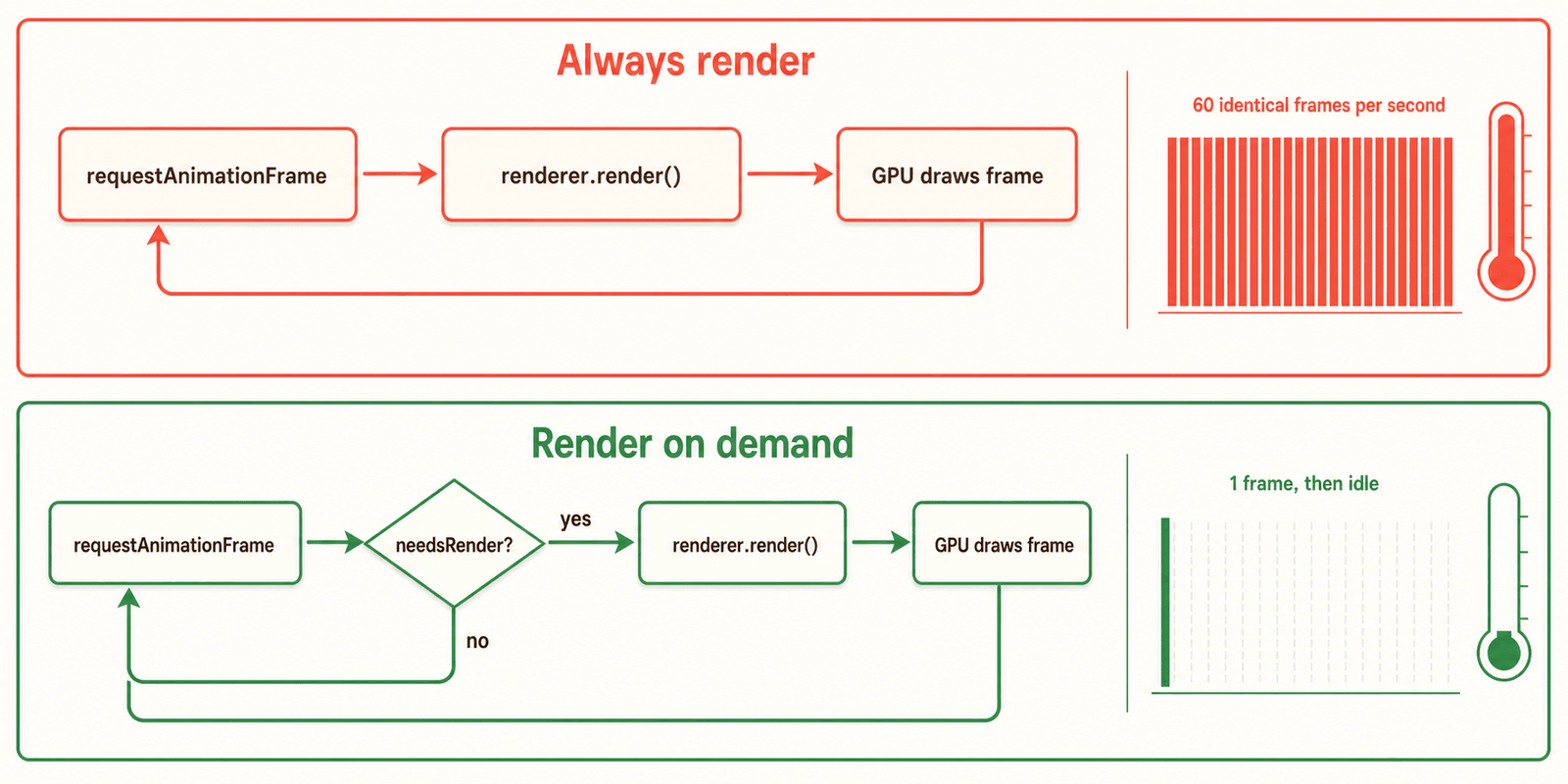
requestAnimationFrame fires on every repaint, roughly 60 times a second, and renderer.render(...) clears the framebuffer and redraws every object in the scene. So this loop repaints everything, 60 times a second, forever, whether or not anything changed. A GPU pinned at full tilt is exactly what heats up a phone.
The GPU has no idea your scene is "basically static." A motionless Ludo board at 60 frames per second costs exactly as much as a board mid-animation, because it's doing the same work either way, while you stare at a menu deciding your move.
So the heat was never about the framework. It was about asking the GPU to repaint an unchanging picture 60 times a second for no reason. Watch the difference, and tap "Make a move" on the cold one:
The left phone is the tutorial loop. It climbs to hot and stays there. The right one only draws when something actually happened, so it sits cold until you poke it. Same board, same framework. The only difference is whether the loop bothers to draw when nothing moved.
And no, switching to Canvas2D wouldn't have saved me. A 60fps loop redrawing a full-screen canvas heats a phone just as happily, 3D or not.
Only render when something changed
The fix is simple: stop rendering when nothing changed. Keep a dirty flag, set it whenever something on screen actually changes, and only call renderer.render() on frames where it's set.
let needsRender = true; // draw the first frame

function invalidate() {
  needsRender = true; // "the picture is out of date, please redraw it"
}

function animate() {
  requestAnimationFrame(animate);

  // step whatever is actually animating; these call invalidate() if they changed something
  const moving = tweens.update() || particles.update();

  if (needsRender || moving) {
    renderer.render(scene, camera);
    needsRender = false;
  }
}
animate();
Now a Ludo board waiting for your input renders zero frames. You call invalidate() from your input handlers, your animations, your resize listener, anywhere a pixel genuinely changes. A turn-based game spends almost its whole life doing nothing, so almost all of that GPU work just evaporates.
Here's the same loop as a flowchart. Flip the switch and watch where the frame goes:
Idle, the frame falls straight through to "sleep" and the GPU does nothing. The moment something's moving, every frame pays for a real render again, which is exactly what you want, only when you want it.
If you use @react-three/fiber, you get this for free. Set frameloop="demand" on the <Canvas> and call invalidate() when you change something. Same idea, one prop.
Two renderer defaults that double the bill
Render-on-demand kills the wasted frames. But the frames you do draw can each cost about twice what they should, and two renderer defaults are almost always the reason. They bite hardest on phones:
// the expensive defaults
new THREE.WebGLRenderer({ antialias: true });
renderer.setPixelRatio(window.devicePixelRatio); // often 3 on phones
Take them one at a time.
The first is antialias. Turning it on makes Three.js use MSAA, which shades several samples per pixel and averages them instead of shading one. Smoother edges, several times the work on every pixel you draw. On a phone you can barely see the difference. You can absolutely feel the heat.
The second is setPixelRatio, and this one is easier to miss. On a modern phone devicePixelRatio is 2 or 3, so a canvas that's "390 CSS pixels" wide is really painting up to about 1170 physical pixels across, and the GPU fills every one. Since the canvas scales in both width and height, going from a ratio of 1.5 to 3 doesn't double the work. It roughly quadruples it.
Drag both of these around and watch the cost run away from you:
My games run inside a WebView, and on a small phone screen you almost never need full antialiasing or a pixel ratio of 3. So detect that case and dial both back. It roughly halves the GPU load for a result nobody can tell apart:
const lowPower = isWebView || isMobile;
new THREE.WebGLRenderer({ antialias: !lowPower });
renderer.setPixelRatio(Math.min(window.devicePixelRatio, lowPower ? 1.5 : 2));
Two smaller leaks
While I was in there, two more things were heating up the games that did animate:
- Nothing paused when the app went to the background. Browsers fire a
visibilitychangeevent when your tab or app is hidden or comes back. None of the games listened for it, so the loop kept spinning even after you switched apps. The fix: cancel the animation frame when hidden, resume when visible. Put it in one shared helper, every scene needs it. - Per-frame allocations. One game built a
new THREE.Color()every frame during an animation, another rebuilt image textures mid-countdown. Allocating inside a 60fps loop churns the garbage collector, and on mobile its pauses show up as both stutter and extra heat. Make those objects once, reuse them.
Check the loop first
When a "simple" WebGL or Three.js scene cooks a phone, don't reach for a lighter framework. The default requestAnimationFrame pattern renders unconditionally, and an unchanging frame is not a cheap frame. Render only when something changed, cap your pixel ratio and antialiasing on constrained devices, and pause when you're hidden.
