What is USD, and why studios moved their pipelines to it
On this page
For How to Train Your Dragon 3, DreamWorks moved a feature film onto a scene format it had never used in production. The team described how it went at SIGGRAPH 2018, in a talk called Zero to USD in 80 Days. Eighty working days after the first discussion, the studio had its first production-ready USD scenes, and USD became the main way the film's assets and shots were stored, from modeling all the way to compositing.
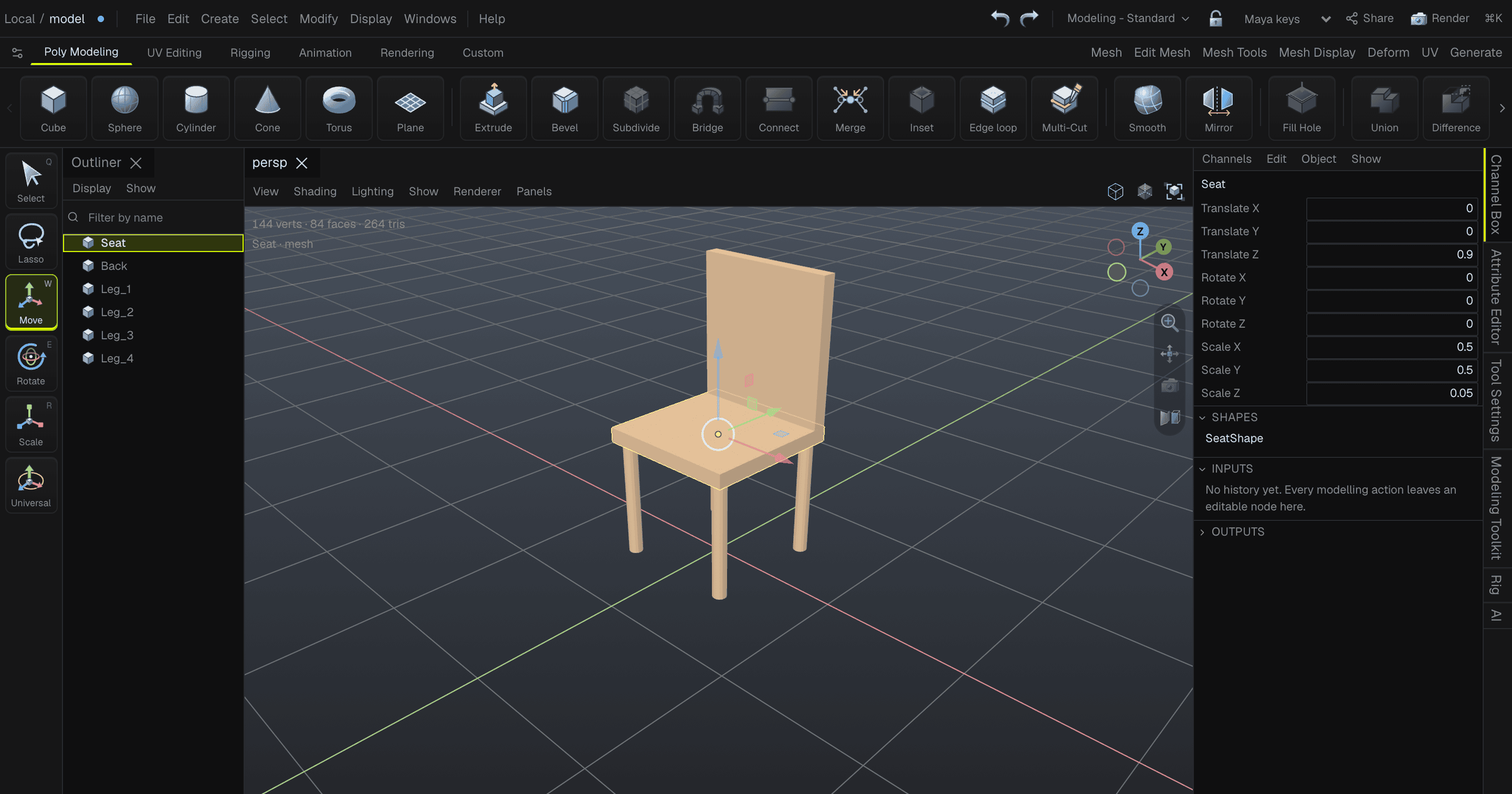
A studio doesn't swap the format under a feature film for fun, so it's worth looking at what USD is and what DreamWorks got out of it. By the end you'll have written a USD file of your own, and seen what happens when a file made in one program opens in another.
A scene is a tree of prims
USD stands for Universal Scene Description. Pixar built it for its own films and open sourced it in July 2016, after studios including MPC, Double Negative, ILM and Animal Logic had given feedback on it.
The model underneath is small. A USD scene, which USD calls a stage, is a tree. Each node in the tree is a prim: a mesh, a light, a camera, a material, or a folder that groups other prims. Every prim has a path, like /World/Chair/Seat, and no two prims share one.
A prim holds attributes, which are typed values like a position or a colour, and relationships, which point at other prims. A mesh uses a relationship to say which material it wears.
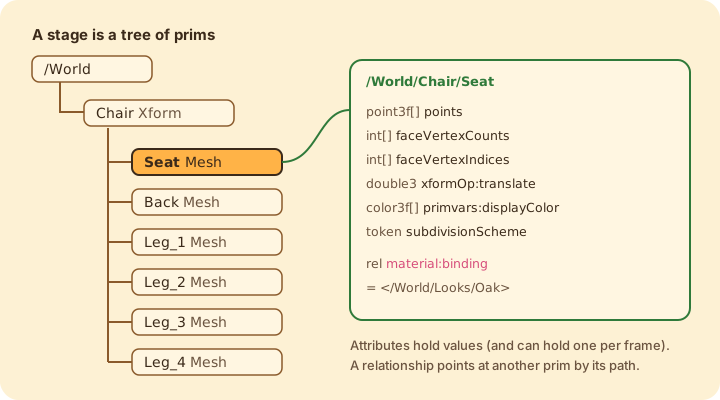
Here is a whole scene written as USD text, a cube that has been moved and coloured:
#usda 1.0
(
    defaultPrim = "World"
    upAxis = "Y"
    metersPerUnit = 1
)

def Xform "World"
{
    def Cube "Box"
    {
        double size = 0.2
        double3 xformOp:translate = (0, 0.1, 0)
        uniform token[] xformOpOrder = ["xformOp:translate"]
        color3f[] primvars:displayColor = [(0.72, 0.5, 0.3)]
    }
}
The block in parentheses at the top describes the file: which prim is the main one, which way is up, and how long one unit is. The last two lines come back later, when a file moves between tools. Each def creates a prim with a type and a name. The lines inside are attributes, and every one of them states its type.
An attribute can also hold a different value at each frame. USD calls these time samples, and that's how it stores animation. A bouncing box would have a translate with one value at frame 1, another at frame 12, and so on.
The same scene comes in three kinds of file
USD has three file extensions, and they all hold the same tree.
A .usda file is the text you just read. You can open it in any editor and diff it in git. A .usdc file is the binary version, which Pixar calls the crate. It is smaller and much faster to load, because a reader can pull in only the parts it needs. A .usdz file is a zip holding a scene and its textures, so one file carries the whole asset. That's the kind you can AirDrop to an iPhone.
I saved the chair from the cover all three ways:
.usda | .usdc | .usdz | |
|---|---|---|---|
| Size of the chair | 15,758 bytes | 8,061 bytes | 8,203 bytes |
| Can you read it | yes | no | no |
| Good for | reading, diffs, debugging | the working file | sending one asset as one file |
The usdz is barely bigger than the usdc because the zip inside it isn't compressed. That's a rule of the format: every file in the package is stored as is, lined up so a reader can use the bytes in place without unzipping anything.
Layers are why studios moved to it
A file format that stores a tree of meshes isn't new. FBX has done that for decades. Pixar's own announcement describes USD as built for "collaborative production workflows", and the feature that makes that work is layering: a stage can be built from many files stacked on top of each other.
Each file in the stack is a layer, and a layer holds opinions about prims: this chair is red, this light is over there. When two layers have an opinion about the same attribute, the stronger layer wins. Neither file gets edited.
That matches how a film gets made. The modeling department owns one layer. Lighting adds its changes in a layer above it, and a director's last-minute note goes in a layer above that. Many people can work on the same shot without touching each other's files, and switching a layer off removes everything it changed.
Try it here. Each layer has opinions about one cube. Switch layers off and watch which opinion wins:
The strongest layer only wins the attributes it has an opinion on. The director moves the cube and repaints it, but its size still comes from the model layer, because the director said nothing about size.
Switch off the model layer and the cube disappears. The two layers above it only say over "Box", which means "change the Box if there is one". Only the model layer says def, so without it there is no cube to change.
One chair file can furnish a whole room
Stacking layers is one way USD combines files. The other two you'll meet most are references and variants.
A reference pulls another file's prim into your scene. A variant set keeps several versions of a prim in one file, and whoever uses the file picks one. Here's a chair with a wood and a metal version:
#usda 1.0
(
    defaultPrim = "Chair"
)

def Cube "Chair" (
    variantSets = "material"
    variants = {
        string material = "wood"
    }
)
{
    variantSet "material" = {
        "wood" {
            color3f[] primvars:displayColor = [(0.72, 0.5, 0.3)]
        }
        "metal" {
            color3f[] primvars:displayColor = [(0.6, 0.6, 0.65)]
        }
    }
}
And a room that uses it twice, once as it comes and once switched to metal:
#usda 1.0

def Xform "Room"
{
    def "Chair_1" (
        references = @./chair.usda@
    )
    {
    }

    def "Chair_2" (
        references = @./chair.usda@
        variants = {
            string material = "metal"
        }
    )
    {
    }
}
I opened room.usda with Pixar's library and asked each chair for its colour. Chair_1 came back wood and Chair_2 came back metal, and chair.usda itself was never edited. Change the chair file and every room that references it picks up the change the next time it opens.
When layers, references and variants disagree about the same attribute, USD settles it in a fixed order, which the docs call LIVRPS. You don't need to memorise it. It's the reason "why is my chair metal?" always has exactly one answer.
Studios built their pipelines on these features. Animal Logic built USD into Maya to animate Peter Rabbit, more than 1,100 shots, and open sourced the plugin (Forging a New Animation Pipeline With USD). DreamWorks made it the main format for every asset and shot. What both studios wanted was a way for many departments and many programs to work on the same scene at once.
Opening a file somebody else made
The Alliance for OpenUSD publishes a set of test files with its specification, and one of them is a small toy biplane, toy_biplane_idle.usdc. Here it is, opened in the same 3D editor as the chair:
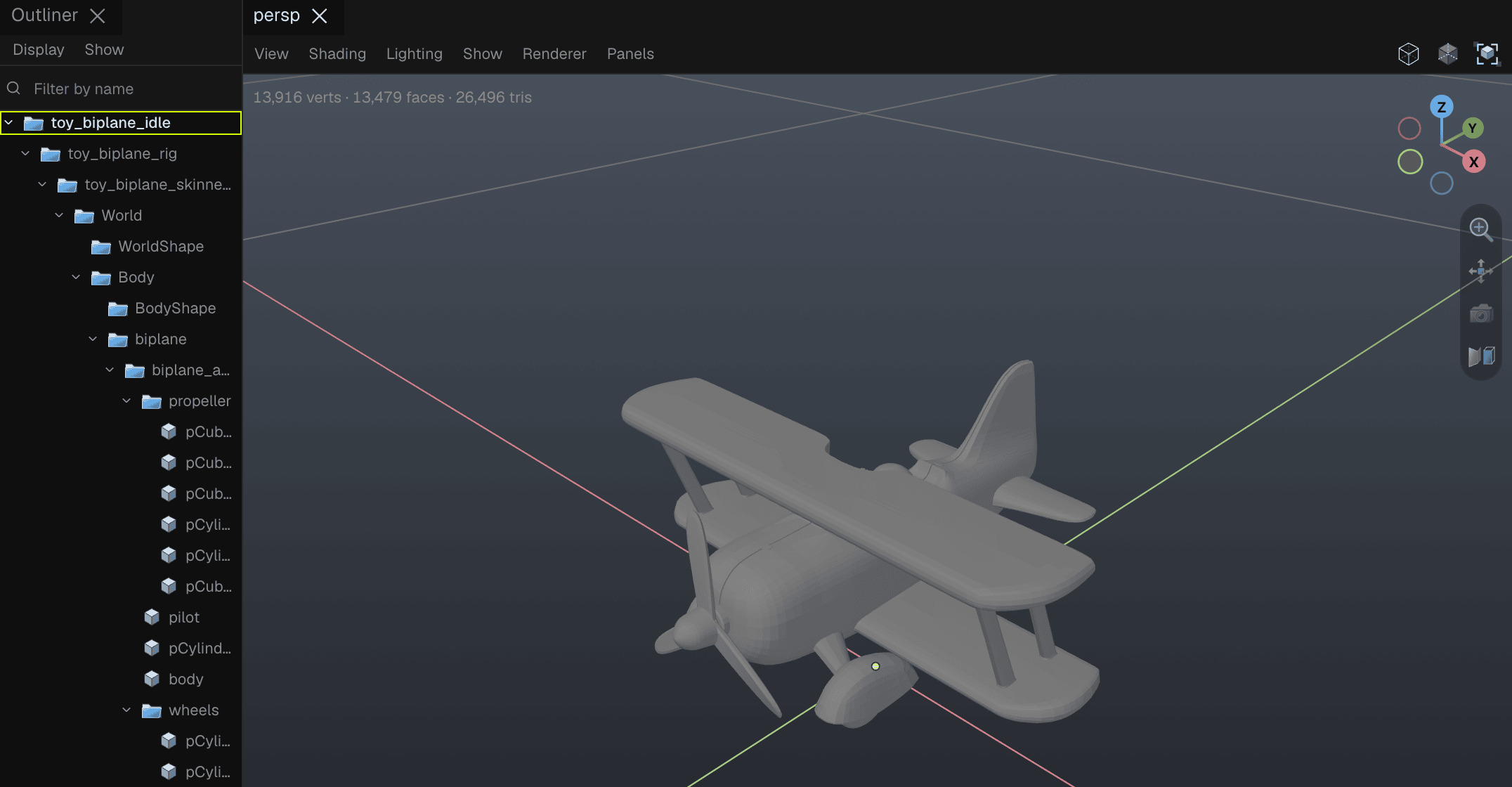
The outliner tells you a few things about where the plane came from. Names like pCube and pCylinder are what Maya calls new primitives, so it was almost certainly modeled in Maya. It was built by someone else in a different program, and it still opened here with its full hierarchy, because both sides agree on what a prim, a mesh and a transform are.
Asking Pixar's library about the file says more. It has 15 meshes, a skeleton and a one-second skeletal animation, 60 frames at 60 frames per second. Its metadata says Y is up and one unit is one centimetre. The cube I wrote earlier says Y is up and one unit is one metre.
Those two lines of metadata exist for exactly this case. A tool that ignores metersPerUnit will draw this plane a hundred times too big next to the cube, or the cube a hundred times too small. A tool that reads it scales one to match the other. The conversion is up to the tool, and the file's job is to state its units so the tool can do it.
Most tools support USD, and a few are built on it
Outside film pipelines, USD is usually one format among several. Maya, Unreal, Unity and most other big 3D tools import and export USD, often through a plugin. When they open a USD file, most of them convert it into their own data and keep working in their own format, the same way they treat FBX or glTF.
A smaller group of tools is built on it, and uses a USD stage as the scene itself.
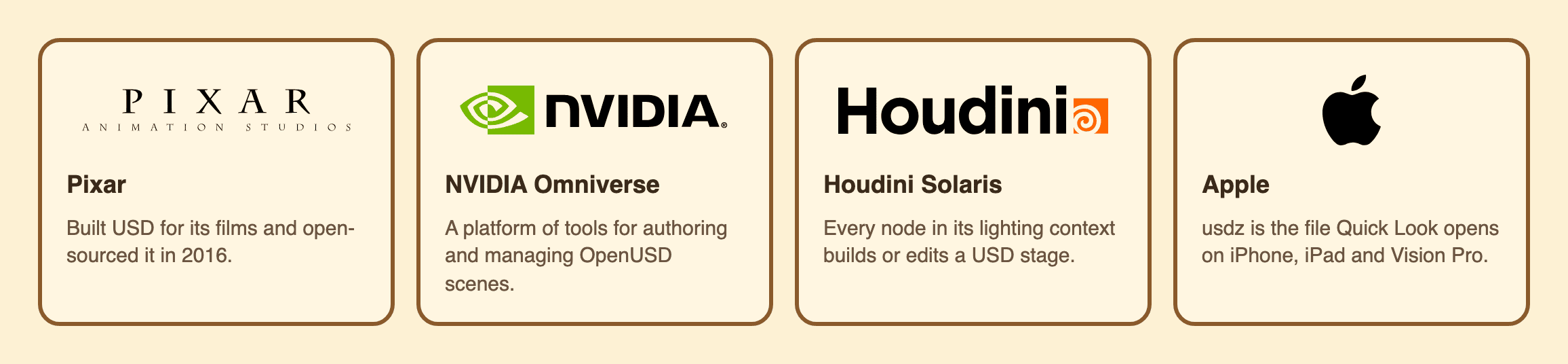
NVIDIA Omniverse is a set of tools for authoring and managing OpenUSD scenes. In Houdini's lighting context, Solaris, each node creates or modifies a USD stage. On Apple's platforms, Quick Look uses usdz to show 3D objects in Safari, Messages, Mail and Notes, on iPhone, iPad and Vision Pro.
Support spread mostly because the big companies agreed on it. In August 2023 Pixar, Adobe, Apple, Autodesk and NVIDIA formed the Alliance for OpenUSD to standardise it, and Epic Games, Unity and SideFX are among the members that joined them. Once the companies behind most of the big 3D tools and platforms agree on one exchange format, it gets hard for anyone else to skip it.
What USD leaves out
USD stores what a scene looks like, and much less about how the scene was made. That can be a surprise if you expect it to replace your tool's own file.
The biplane is a good example. Its animation is stored as the skeleton's pose at each of its 60 frames. The curves an animator shaped to get that motion, with their handles, aren't in the file. Its rig is a skeleton with skin weights, and there's nowhere to put an IK handle or a constraint. There's also no standard way to say "this mesh is a cube, subdivided twice, then mirrored". You get the finished mesh.
So a tool that wants to keep those things has to store them as its own custom attributes and write the plain result next to them for everyone else to read. That gap is also why most tools keep their own format for work in progress, and use USD for the result that other tools need to open.
Write one and open it yourself
You can go from nothing to a USD file on your phone in a few minutes. Pixar publishes its library on PyPI:
pip install usd-core
Save the cube from earlier as cube.usda, then turn it into the other two kinds of file:
from pxr import Usd, UsdUtils

stage = Usd.Stage.Open("cube.usda")
print([str(p.GetPath()) for p in stage.Traverse()])  # ['/World', '/World/Box']
stage.Export("cube.usdc")
UsdUtils.CreateNewUsdzPackage("cube.usdc", "cube.usdz")
When I ran it, the text file was 329 bytes, the binary 1,181 and the package 1,347, and Apple's usdchecker --arkit passed the package. On a Mac, select cube.usdz in Finder and press space to open it in Quick Look, or AirDrop it to an iPhone and tap it.
Then change displayColor in the text file, run the script again, and open it again. After that, try the chair and the room from earlier: save both files in one folder, open room.usda with Usd.Stage.Open, and flip Chair_2 back to wood.
An Oscar for a file format
In February 2024 the Academy of Motion Picture Arts and Sciences gave five Pixar engineers, F. Sebastian Grassia, Alex Mohr, Sunya Boonyatera, Brett Levin and Jeremy Cowles, a Scientific and Engineering Award for USD. The citation calls it "the first open-source scene description framework capable of accommodating the full scope of the production workflow across a variety of studio pipelines". It singles out two parts by name: the layering system, and the crate file format.
Those are the widget and the .usdc file from earlier in this post. Here is the Academy's own video about the award:
If you want to go further, Pixar's USD documentation has the full glossary and tutorials, and NVIDIA's OpenUSD video series is a good next step after this post.
